Pausing a Subscription
ProSelect allows users with eligible subscriptions to pause their plan temporarily. This feature is designed to provide flexibility for studios needing a short break without canceling an account.
Overview
You can pause your subscription for up to 6 months at a time. During this period:
- Your account will be placed on hold, and ProSelect will be deactivated.
- You will not be billed.
- You may resume service at any time within the 6-month window.
- If you do not resume manually, your subscription will automatically renew at the end of 6 months. Your account will be charged for your next payment. ProSelect will be activated.
Pausing Policy
- You may pause your subscription once per billing cycle (monthly, 6-month, or annual).
- After resuming, you must complete at least one payment before pausing again.
- Unused time is credited as a dollar value based on a 30-day month and applied to your next payment.
- When resuming, you can choose one of the following:
- Apply credits only – your billing date will change.
- Apply credits plus any required payment to reach your billing date – your current billing date will stay the same.
- Discounts and promotions are calendar-based and do not extend during paused periods.
- Pausing for more than 6 months total in a 12-month period will result in the loss of any price lock.
- Note: Accounts on PLUS conversion pricing are not eligible for pausing.
- Credits are non-refundable, and cannot be transfered to other subscriptions or accounts.
Pausing Your Subscription
- When you pause, your subscription stops immediately.
- You no longer use the remaining time you’ve already paid for.
- The unused days are converted into a credit, based on your plan’s daily rate.
- This credit is saved and will be applied the next time your subscription is resumed.
- While paused, no invoices are issued and no payments are collected.
Resuming Your Subscription
- When you resume, your subscription becomes active again from that day forward.
- The system calculates the cost for the time from your resume date until your next scheduled billing date.
- Your saved credit is applied to reduce that cost.
- You can choose one of two resume options:
- Option A – Apply credits only (billing date changes): Your credits cover the time from your resume date until they run out. Your new billing date will shift to that day.
- Option B – Apply credits + payment (keep billing date): Your credits are applied toward the cost up to your original billing date. If needed, you pay the difference. Billing then continues on your original date.
The examples below work the same for Monthly, 6-month prepay, and Annual prepay subscriptions—the only thing that changes is how far away your next billing date is (it could be a few days, a month, or many months).
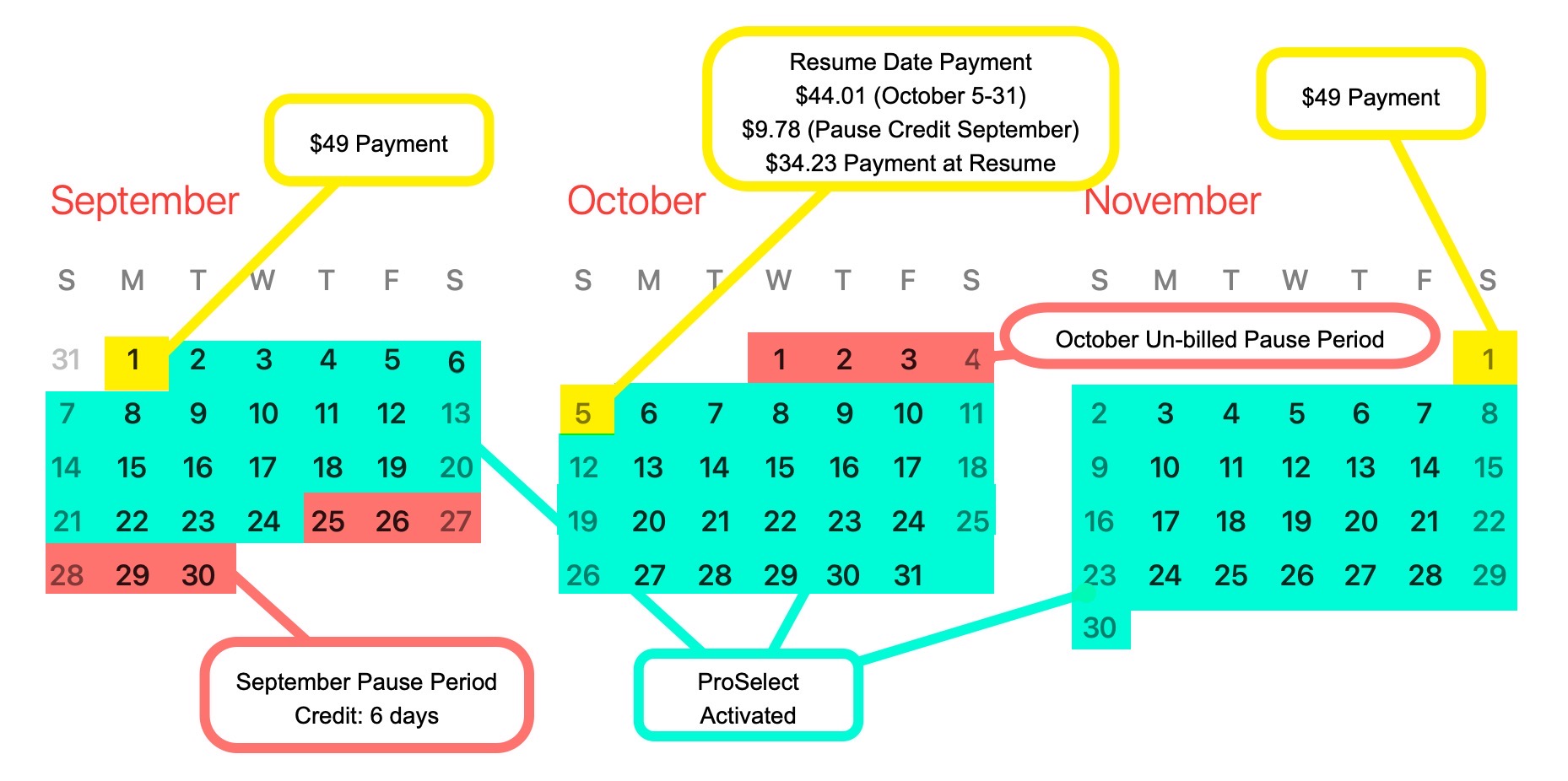
Example 1: Short Pause
- Billing Date: 1st of the Month @ $49.00/month
- Pause Date: September 25
- Resume Date: October 5
- Credit Earned (unused days from Sep 25–30): 6 × $1.63 = $9.78
- Cost from Oct 5–31 (days until next billing): 27 × $1.63 = $44.01
Option A – Apply credits only (billing date changes):
- Credit Applied: $9.78 (covers 6 days from Oct 5)
- Amount Due at Resume: $0.00
- New Billing Date: October 11 @ $49.00/month
Option B – Apply credits + required payment (keep billing date):
- Credit Applied: $9.78
- Amount Due at Resume: $44.01 − $9.78 = $34.23
- Next Billing: November 1 @ $49.00
Example 2: Long Pause
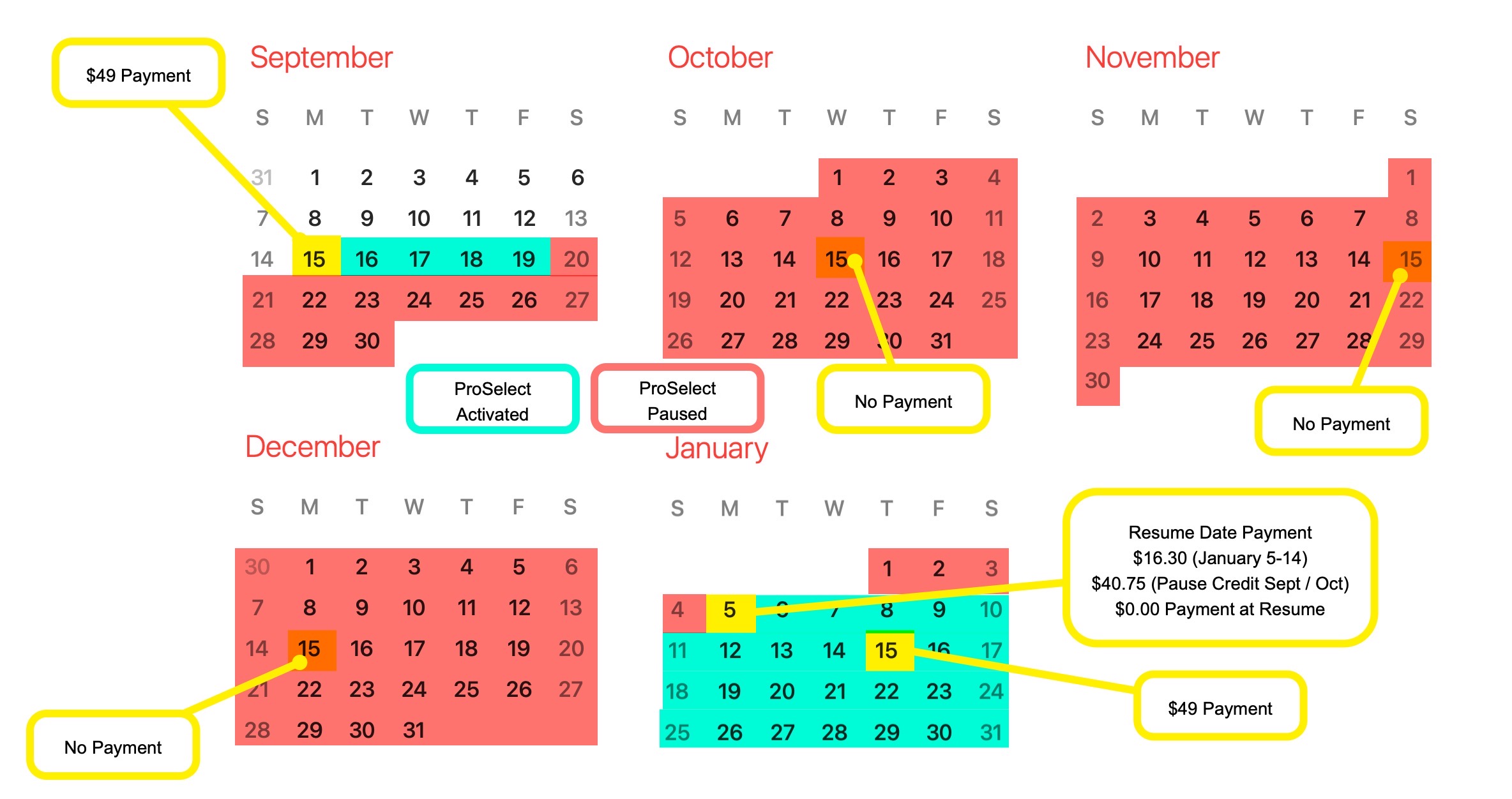
- Billing Date: 15th of the Month @ $49.00/month
- Pause Date: September 20
- Resume Date: January 5
- Credit Earned: 25 unused days × $1.63 = $40.75
Option A – Apply credits only (billing date changes):
- Credit Applied: $40.75 (covers 25 days from Jan 5)
- Amount Due at Resume: $0.00
- New Billing Date: January 30 @ $49.00/month
Option B – Apply credits + required payment (keep billing date):
- Credit Applied: $16.30 (covers Jan 5–14) → $24.45 credit remains
- Amount Due at Resume: $0.00
- Next Billing: January 15 @ $49.00 − $24.45 = $24.55
Can I pause my subscription?
Yes! If you need a break, you can pause your subscription. While paused, you won’t be billed, and your account stays on hold until you’re ready to come back. Note: Pausing isn’t available on legacy PLUS discounted plans.
How long can I pause for?
You can pause your subscription for a maximum of 6 months. You can choose to resume at any time through your account before the 6 months are up. If you don’t resume earlier, your subscription will automatically resume after 6 months.
How often can I pause?
You can pause once per billing cycle (monthly, semi-annual, annual). After your pause ends and billing resumes, you’ll need to make at least one payment before you can pause again.
What happens to my billing date?
You can either apply credits only, in which case your billing date will move to the day your credits run out, or apply credits plus payment, which keeps your billing date the same as before your pause. Note: If your billing date is the 28th–31st, it may shift slightly depending on the month length.
Do I get credit for unused time?
Yes! If you pause partway through a billing period, you’ll automatically receive a pro-rated credit for unused days. Credits are always calculated on a 30-day basis, regardless of plan length. Examples (standard pricing):
- Monthly ($49): Pause halfway - $24.50 credit
- 6-Month ($264.60): Pause with 90 unused days - $132.30 credit
- Annual ($499.80): Pause with 270 unused days - $374.85 credit
Can I pause for more than 6 months?
No. Pauses are limited to 6 months at a time. Important: If you pause for more than 6 months total within a 12-month period, you’ll lose any price lock guarantee tied to your account.
What happens to discounts during a pause?
Discounts are based on calendar dates, not subscription activity. For example, a January–June discount ends in June, even if you paused it from March to May.
What happens when my pause ends?
You can resume earlier at any time through your account. If you don’t, your subscription automatically resumes after 6 months. Your next payment will be charged on your regular billing date, and any available credits will be applied.
Are Credits Refundable?
No. If you need to cancel your subscription, any remaining credits will expire and aren’t refundable.
What if I don’t want to continue with ProSelect when my 6-month pause ends?
If you don’t plan to continue subscribing, please cancel at least 3 days before your billing date so your subscription doesn’t automatically resume or bill.
Will I be notified when my 6-month pause is going to end?
Yes. We’ll send a reminder email 7 days before your billing date.
Can I cancel my subscription and get a refund if I miss my reactivation date?
Yes—if you contact us within 3 days after your billing date, we can issue a refund minus a manual processing fee (minimum $10). After that window, refunds aren’t available.